March 2, 2026
Designing for Machine Legibility
An experimental pursuit of creating an efficient AI-powered workflow between design to development.
My role
Staff Designer
Collaborator
Lead Frontend Engineer
Project type
Internal R&D
Overview
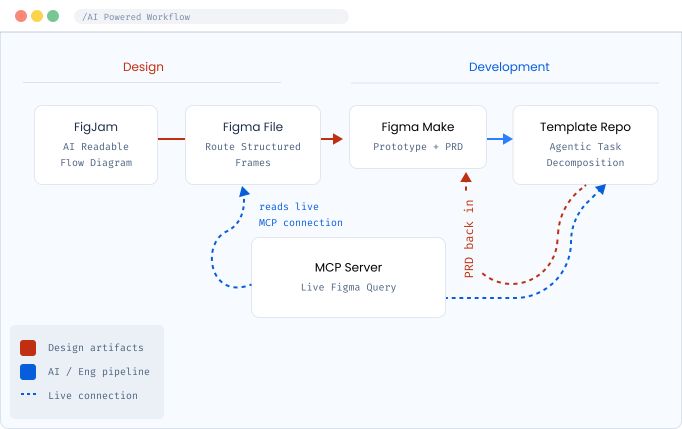
Our Lead FE built a template repository powered by an MCP server that accepts a PRD, aligns with team coding standards, pulls from the internal design system, and runs a prompting pipeline to output production-ready code.
The problem handed to me: What does the design side of this pipeline need to look like?
01
AI-Readable Flow Nodes
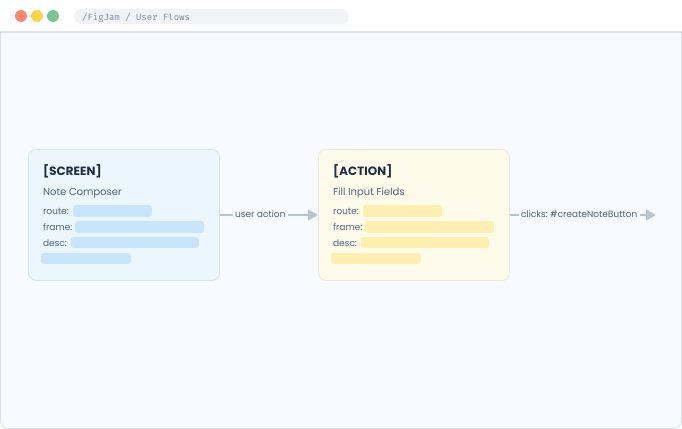
Redesigned FigJam flow diagrams so every node was a structured data object, not just a label. Each node follows a strict, machine-parseable format:
Screen name: human-readable title of the view
Route path: the URL route this screen maps to
Frame link: direct link to the corresponding Figma frame
Description: plain-language context for what this screen does
02
Route-Based File Structure
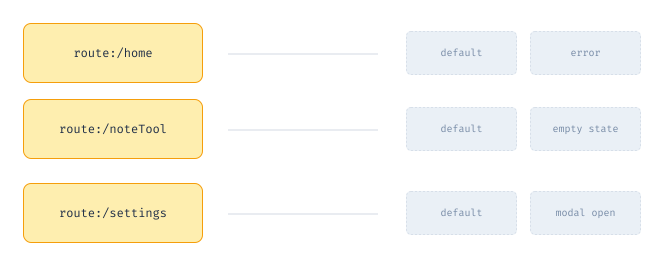
Sections → named by route path (e.g. /dashboard)
Frames within sections → named states of that route (default, empty, error, loading, modal-open)
Every section name is a direct 1:1 match with a FigJam flow node and a codebase path
03
Designs w/ Element ID Naming
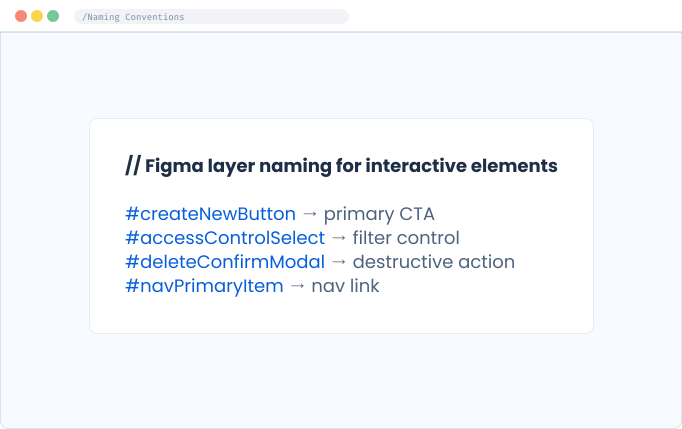
Every interactive element was given an element ID in its Figma layer name.
When a FigJam node references
#createNewButton, the exact string exists in the Figma layer panelThe MCP server can query by element ID and get a single, unambiguous result
04
Prototype Validation & PRD Generation
The PRD became the seed for the staged prompting pipeline.
FigJam flow + Figma frames → Figma Make
Validate prototype output matches design intent
Copilot generates a custom PRD extraction prompt
Prompt → Figma Make → structured PRD output
PRD feeds into the template repository as the first input to the staged pipeline
05
Understanding the Staged
Prompting Pipeline
One of the most important things I had to wrap my head around as the designer was how the FE's build process actually worked, because it directly shaped every design decision I made…
aside from that fact I found it pretty cool.
— Rather than asking the LLM to generate the entire product in a single prompt, the build process was deliberately broken into discrete, sequential stages.
06
MCP for Live Design Context
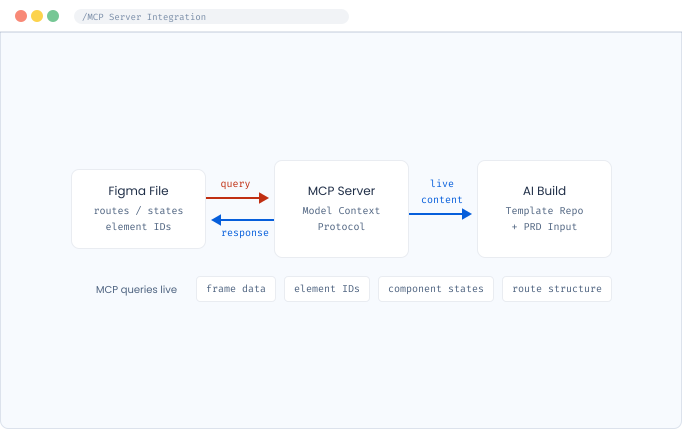
Beyond the PRD, we connected an MCP (Model Context Protocol) server directly to the Figma file to give the LLM a live query channel into our design at build time rather than relying on a static export.
What this enabled on the design side:
The AI could pull frame data, component states, and element IDs in real time
Route structure and naming conventions became a queryable schema, so hard file hygiene became a requirement.
What this changed about
how we ship
Zero
Transcription errors between design intent and AI input created a lossless handoff.
1:1
Parity between Figjam node names, Figma layer names, and code element IDs across the full pipeline.
Live
Design file became a real-time data source via MCP — not a static export that goes stale overnight
Full
End-to-end loop from design file → prototype → PRD → production build, no manual re-entry
// What's next
Exploring automated PRD validation against the design file via MCP
Considering whether the FigJam flow could be AI-generated from a brief rather than hand-authored
Document conventions as onboarding material so that any new designer should be able to adopt this on day one
Confidential — all proprietary tooling, product names & visuals omitted
March 2, 2026
Designing for Machine Legibility
An experimental pursuit of creating an efficient AI-powered workflow between design to development.
My role
Staff Designer
Collaborator
Lead Frontend Engineer
Project type
Internal R&D
Overview
Our Lead FE built a template repository powered by an MCP server that accepts a PRD, aligns with team coding standards, pulls from the internal design system, and runs a prompting pipeline to output production-ready code.
The problem handed to me: What does the design side of this pipeline need to look like?
01
AI-Readable Flow Nodes
Redesigned FigJam flow diagrams so every node was a structured data object, not just a label. Each node follows a strict, machine-parseable format:
Screen name: human-readable title of the view
Route path: the URL route this screen maps to
Frame link: direct link to the corresponding Figma frame
Description: plain-language context for what this screen does
02
Route-Based File Structure
Sections → named by route path (e.g. /dashboard)
Frames within sections → named states of that route (default, empty, error, loading, modal-open)
Every section name is a direct 1:1 match with a FigJam flow node and a codebase path
03
Designs w/ Element ID Naming
Every interactive element was given an element ID in its Figma layer name.
When a FigJam node references
#createNewButton, the exact string exists in the Figma layer panelThe MCP server can query by element ID and get a single, unambiguous result
04
Prototype Validation & PRD Generation
The PRD became the seed for the staged prompting pipeline.
FigJam flow + Figma frames → Figma Make
Validate prototype output matches design intent
Copilot generates a custom PRD extraction prompt
Prompt → Figma Make → structured PRD output
PRD feeds into the template repository as the first input to the staged pipeline
05
Understanding the Staged
Prompting Pipeline
One of the most important things I had to wrap my head around as the designer was how the FE's build process actually worked, because it directly shaped every design decision I made…
aside from that fact I found it pretty cool.
— Rather than asking the LLM to generate the entire product in a single prompt, the build process was deliberately broken into discrete, sequential stages.
06
MCP for Live Design Context
Beyond the PRD, we connected an MCP (Model Context Protocol) server directly to the Figma file to give the LLM a live query channel into our design at build time rather than relying on a static export.
What this enabled on the design side:
The AI could pull frame data, component states, and element IDs in real time
Route structure and naming conventions became a queryable schema, so hard file hygiene became a requirement.
What this changed about
how we ship
Zero
Transcription errors between design intent and AI input created a lossless handoff.
1:1
Parity between Figjam node names, Figma layer names, and code element IDs across the full pipeline.
Live
Design file became a real-time data source via MCP — not a static export that goes stale overnight
Full
End-to-end loop from design file → prototype → PRD → production build, no manual re-entry
// What's next
Exploring automated PRD validation against the design file via MCP
Considering whether the FigJam flow could be AI-generated from a brief rather than hand-authored
Document conventions as onboarding material so that any new designer should be able to adopt this on day one
Confidential — all proprietary tooling, product names & visuals omitted
March 2, 2026
Designing for Machine Legibility
An experimental pursuit of creating an efficient AI-powered workflow between design to development.
My role
Staff Designer
Collaborator
Lead Frontend Engineer
Project type
Internal R&D
Overview
Our Lead FE built a template repository powered by an MCP server that accepts a PRD, aligns with team coding standards, pulls from the internal design system, and runs a prompting pipeline to output production-ready code.
The problem handed to me: What does the design side of this pipeline need to look like?
01
AI-Readable Flow Nodes
Redesigned FigJam flow diagrams so every node was a structured data object, not just a label. Each node follows a strict, machine-parseable format:
Screen name: human-readable title of the view
Route path: the URL route this screen maps to
Frame link: direct link to the corresponding Figma frame
Description: plain-language context for what this screen does
02
Route-Based File Structure
Sections → named by route path (e.g. /dashboard)
Frames within sections → named states of that route (default, empty, error, loading, modal-open)
Every section name is a direct 1:1 match with a FigJam flow node and a codebase path
03
Designs w/ Element ID Naming
Every interactive element was given an element ID in its Figma layer name.
When a FigJam node references
#createNewButton, the exact string exists in the Figma layer panelThe MCP server can query by element ID and get a single, unambiguous result
04
Prototype Validation & PRD Generation
The PRD became the seed for the staged prompting pipeline.
FigJam flow + Figma frames → Figma Make
Validate prototype output matches design intent
Copilot generates a custom PRD extraction prompt
Prompt → Figma Make → structured PRD output
PRD feeds into the template repository as the first input to the staged pipeline
05
Understanding the Staged
Prompting Pipeline
One of the most important things I had to wrap my head around as the designer was how the FE's build process actually worked, because it directly shaped every design decision I made…
aside from that fact I found it pretty cool.
— Rather than asking the LLM to generate the entire product in a single prompt, the build process was deliberately broken into discrete, sequential stages.
06
MCP for Live Design Context
Beyond the PRD, we connected an MCP (Model Context Protocol) server directly to the Figma file to give the LLM a live query channel into our design at build time rather than relying on a static export.
What this enabled on the design side:
The AI could pull frame data, component states, and element IDs in real time
Route structure and naming conventions became a queryable schema, so hard file hygiene became a requirement.
What this changed about
how we ship
Zero
Transcription errors between design intent and AI input created a lossless handoff.
1:1
Parity between Figjam node names, Figma layer names, and code element IDs across the full pipeline.
Live
Design file became a real-time data source via MCP — not a static export that goes stale overnight
Full
End-to-end loop from design file → prototype → PRD → production build, no manual re-entry
// What's next
Exploring automated PRD validation against the design file via MCP
Considering whether the FigJam flow could be AI-generated from a brief rather than hand-authored
Document conventions as onboarding material so that any new designer should be able to adopt this on day one
Confidential — all proprietary tooling, product names & visuals omitted